Content Calendar
The Problem
A content plan spread across a calendar hides its own problems: the quiet week before a launch, two posts stacked on one day — you stop seeing them.
How to use
Get a free API key
Sign up for Vibecode and issue a key with the scopes listed below. It takes less than a minute.
Open your AI agent
Launch Claude Code, Cursor, ChatGPT or whichever AI model you work with.
Paste the prompt and key
Copy the prompt below, replace vibe_api_xxx with your API key and send it to the agent. It will call the API and write working code on its own.
Prompt for AI
Copy this prompt and send it to your AI model along with your Vibecode API key
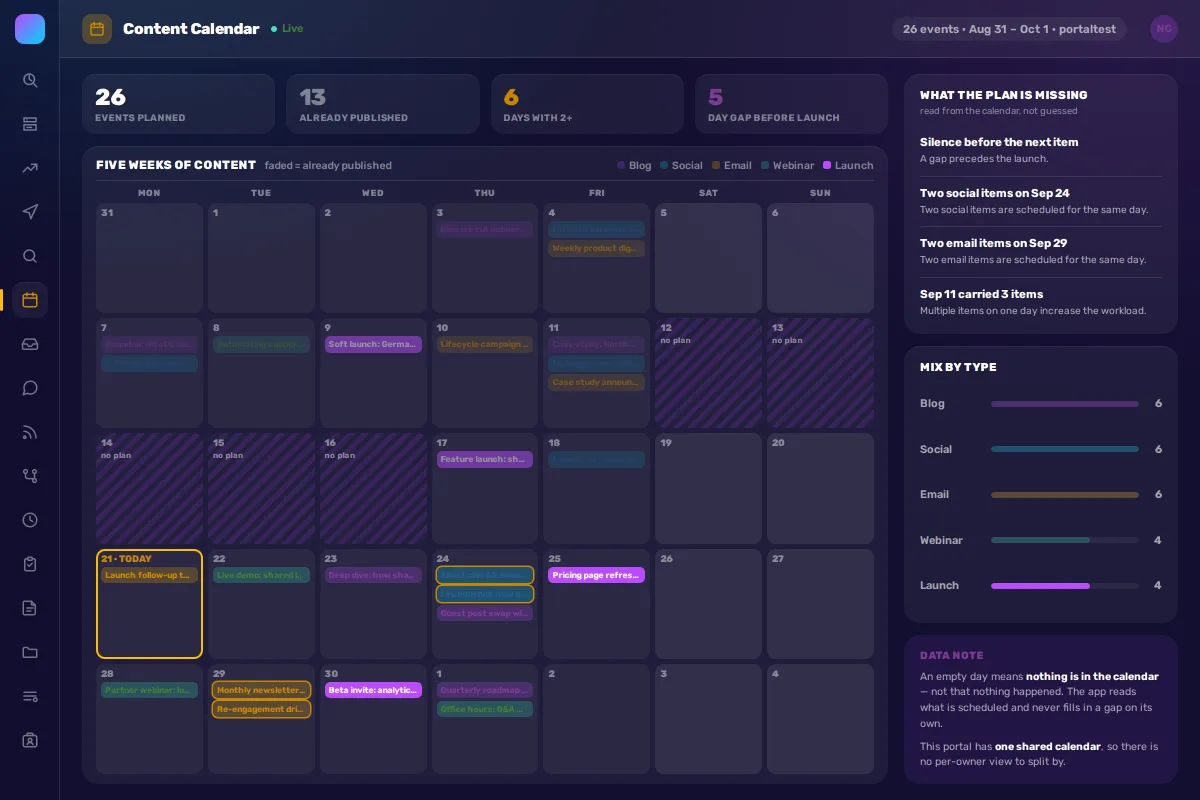
Show me the content plan the way it actually looks. It reads the calendar, lays five weeks out on a grid, colours each item by type — blog, social, email, webinar, launch — and dims what's already published. Then it points at what a calendar alone won't tell you: the five quiet days right before a launch, the two social posts scheduled for the same day, the week where one day carries three items. It reads only what's scheduled: an empty day is shown as empty, never filled in with a guess.

Read events with GET /v1/calendar-events — type and ownerId are required, or nothing comes back. Parse the content type from a prefix in the event title ([Blog], [Social], [Email], [Webinar], [Launch]); the entity has no type field of its own.
Watch the timezone: an offset sent as +03:00 comes back normalised, which can move an early-morning event to the previous day — normalise before bucketing by day.
Compute gaps, pile-ups and same-type collisions in code. Use POST /v1/chat/completions only to phrase each finding, and only from findings the code already established.

API key: vibe_api_xxx (scopes: calendar, vibe:ai)
API Discovery: https://vibecode.bitrix24.com/v1/me
What You Get
Your whole plan on one five-week grid, colour-coded by type, with the gaps, pile-ups and same-day collisions called out — read from what's actually scheduled, never guessed.
Required Scopes
Endpoints for these scopes
The API resource name does not always match the scope name. Use these exact paths — guessing /v1/:scope often returns 404.
calendar
Related Solutions
AI Lead Classifier
New leads arrive without sorting. Managers waste time on manual classification instead of working with hot clients.
AI Product Description Generator
Hundreds of products in catalog without descriptions. Copywriter can't keep up — products don't sell.
AI Chatbot for Bitrix24
Employees ask the same questions: how to request vacation, where's the contract template, what's the deal status. HR and managers waste time on routine answers.