Smart Intake
The Problem
Requests land from every channel and someone has to read each one, decide what it's about and send it on. Triage is slow and the urgent ones wait in line with the rest.
How to use
Get a free API key
Sign up for Vibecode and issue a key with the scopes listed below. It takes less than a minute.
Open your AI agent
Launch Claude Code, Cursor, ChatGPT or whichever AI model you work with.
Paste the prompt and key
Copy the prompt below, replace vibe_api_xxx with your API key and send it to the agent. It will call the API and write working code on its own.
Prompt for AI
Copy this prompt and send it to your AI model along with your Vibecode API key
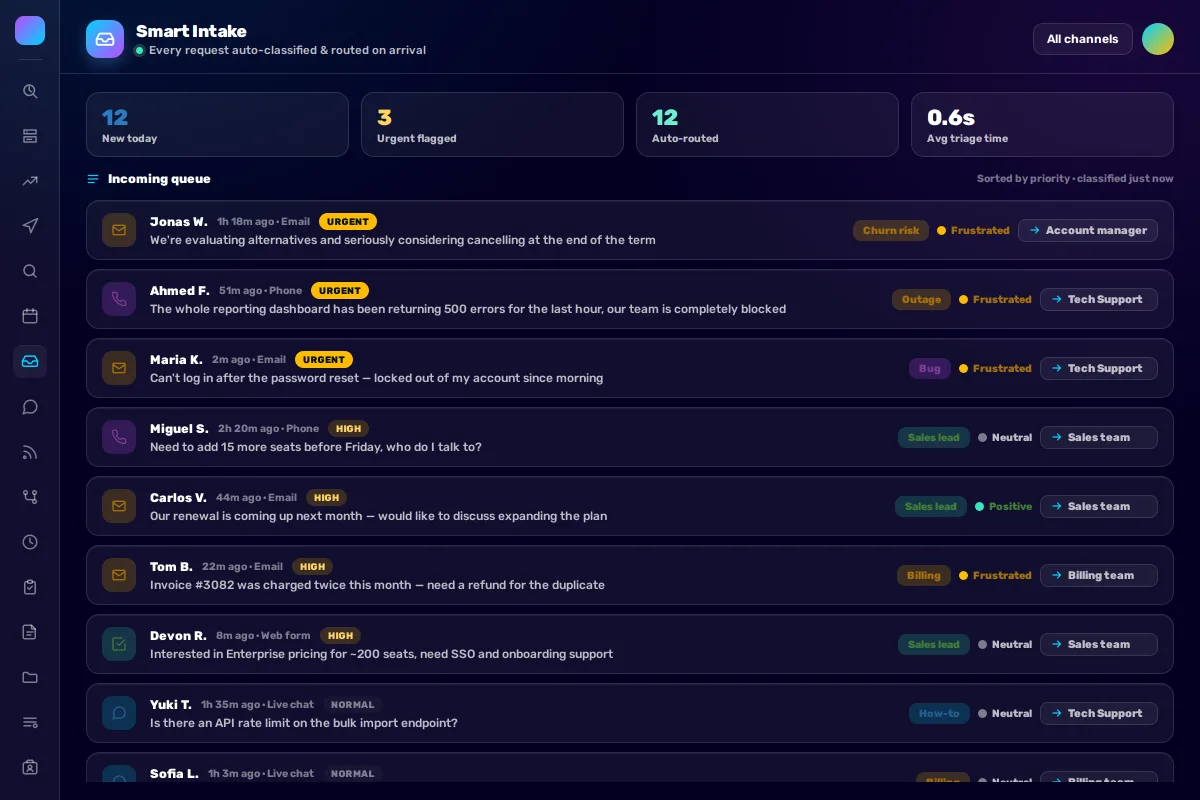
Build me a Smart Intake tool for Bitrix24. As requests arrive from any channel, classify each by topic, sentiment and urgency, then route it to the right team — shown as a live queue with tags and destinations, plus counters for new, urgent and auto-routed. Clean, light styling.

For each request, call POST /v1/chat/completions asking it to return a fixed set of fields:
category, sentiment (positive/neutral/frustrated), priority (urgent/high/normal/low), route (team name).
Sort the queue by priority. Anything the model can't confidently route → mark for manual triage (don't guess).

API key: vibe_api_xxx (scopes: vibe:ai)
API Discovery: https://vibecode.bitrix24.com/v1/me
What You Get
Every request classified by topic, sentiment and urgency the moment it lands, and routed to the right team — a live queue with counters for new, urgent and auto-routed.
Required Scopes
Related Solutions
Tech Support Bot
Support tickets are processed manually — initial diagnosis, classification, assignment.
NPS Customer Surveys
No system for collecting customer feedback. Unclear who's satisfied, who's leaving.
CSAT Pulse
You collect satisfaction ratings but they sit as a bare number. The comments that explain the number go unread, so you never learn what to actually fix.