Deal Radar
The Problem
Before a sales call you piece the client together from tabs — their site, the news, the CRM history. It eats minutes per deal and you still walk in half-briefed.
How to use
Get a free API key
Sign up for Vibecode and issue a key with the scopes listed below. It takes less than a minute.
Open your AI agent
Launch Claude Code, Cursor, ChatGPT or whichever AI model you work with.
Paste the prompt and key
Copy the prompt below, replace vibe_api_xxx with your API key and send it to the agent. It will call the API and write working code on its own.
Prompt for AI
Copy this prompt and send it to your AI model along with your Vibecode API key
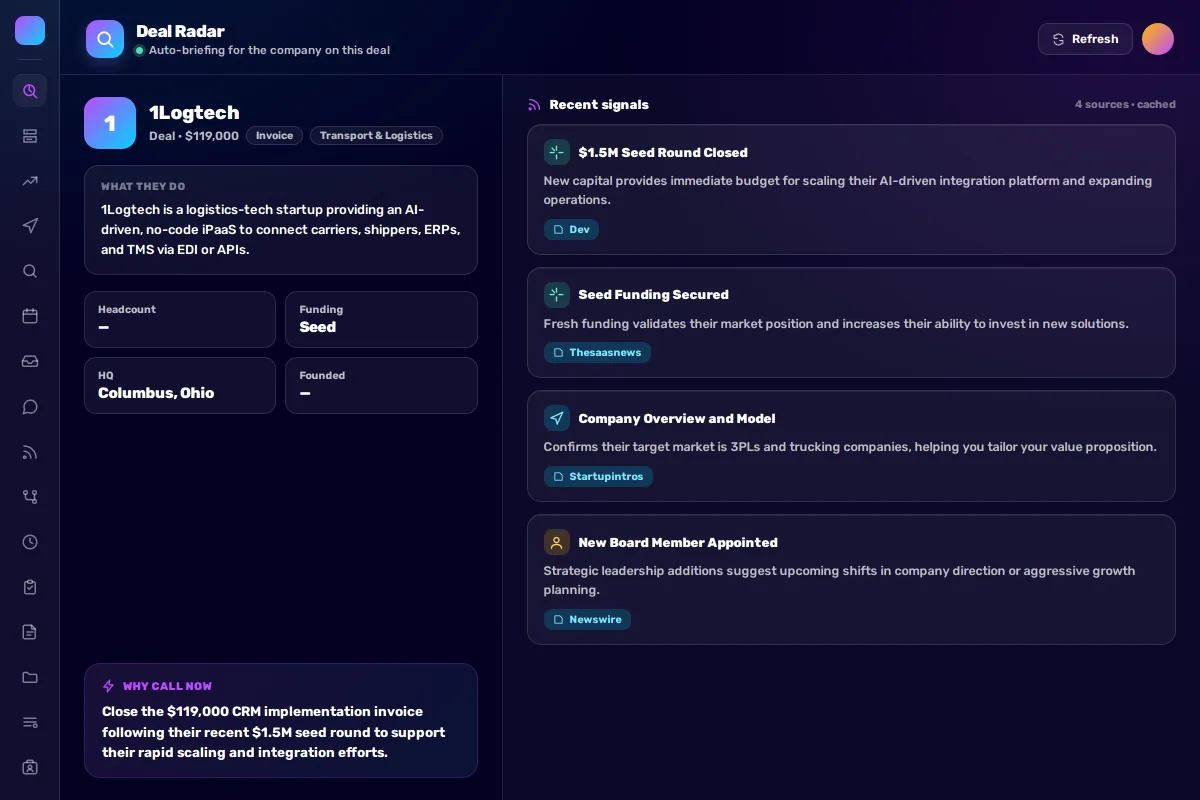
Build me a Deal Radar for Bitrix24. For the company on a deal, generate a live briefing: what they do, a quick snapshot (headcount, funding, HQ), and recent signals (funding, hiring, launches, news) with sources — plus a “why call now” summary. Clean two-column layout, light styling.

Read the deal + linked company via GET /v1/deals/:id and GET /v1/companies/:id.
Find recent signals with POST /v1/search (AI Search) using the company name/domain; keep only on-topic results and show the source for each.
Write the “what they do” + “why call now” text with POST /v1/chat/completions.

API key: vibe_api_xxx (scopes: crm, vibe:search, vibe:ai)
API Discovery: https://vibecode.bitrix24.com/v1/me
Heads-up: CRM field sanitization
Bitrix24 strips text in square brackets (e.g. [TAG]) from some CRM text fields — notably the Comment field (comments). The Title field (title) is kept verbatim. If your scenario writes service markers into comments, avoid square brackets or they will silently disappear.
What You Get
Open a deal and the client is already summarized: what they do, a company snapshot, recent signals with their sources, and a clear reason to call now.
Required Scopes
Endpoints for these scopes
The API resource name does not always match the scope name. Use these exact paths — guessing /v1/:scope often returns 404.
crm
Related Solutions
CRM Assistant in Chat
Managers waste time switching between chat and CRM to check deal status or client contacts.
Daily CRM Digest
Managers can't see the big picture: how many deals are in progress, which ones are stuck, where intervention is needed.
Lead Scoring
Managers process leads in order of arrival, not priority. Hot prospects wait in the queue.